

New Player Registration at HotWins
New account creation on the official HotWins website starts with an email address and password. Applicants then complete a two-stage form covering full name, date of birth and address details, plus country and currency settings. The form also asks for consent to the required policies before submission. A confirmation link arrives by email after signup, while phone verification is not requested at this stage. Full identity checks including ID, proof of address and payment verification apply later before withdrawal.
3 Steps to Registration
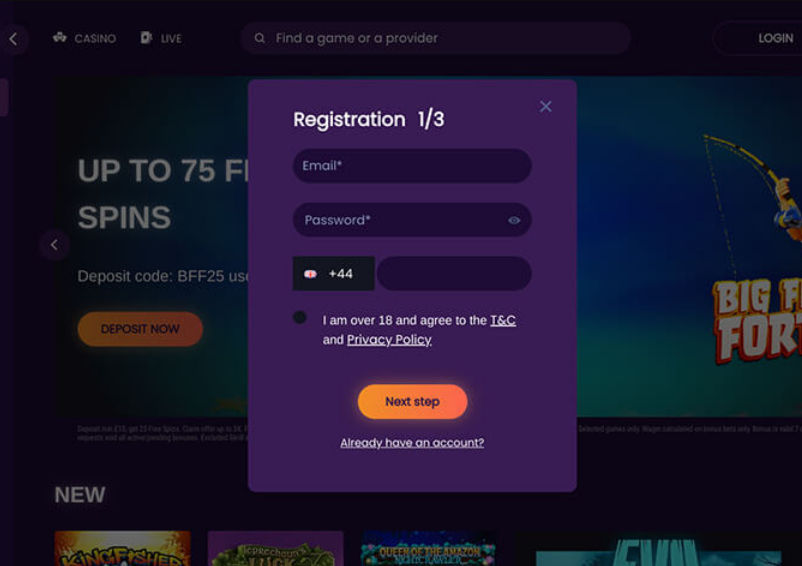
Enter an email address, password and UK phone number, then confirm age and policy consent before selecting Next step.
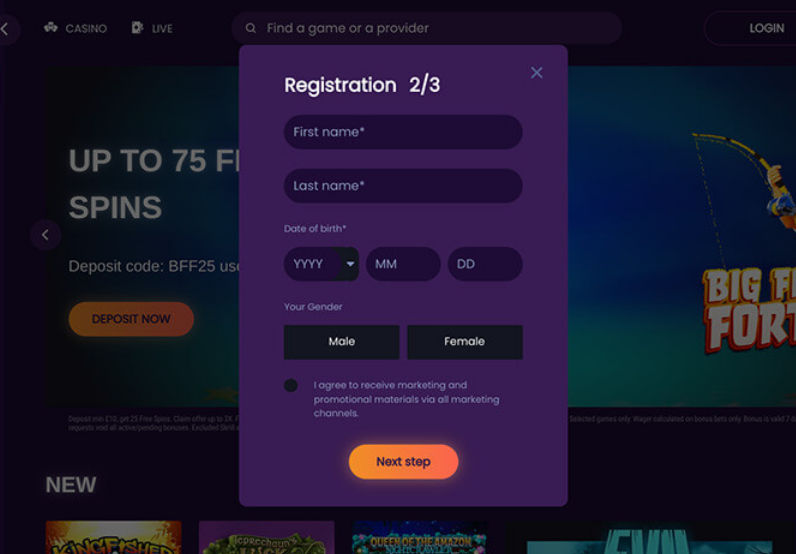
Enter your first name, last name and date of birth, choose a gender option and review marketing consent before continuing.
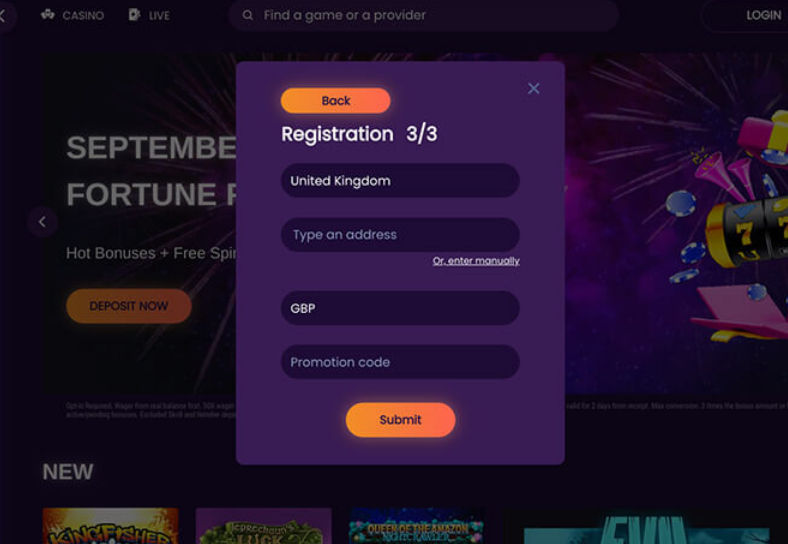
Confirm the United Kingdom and GBP settings, enter your address, add a promotion code if applicable, then select Submit.
Returning to HotWins to Log In
Logging in to HotWins requires the registered email address and matching password. Once signed in, players can move between profile settings, games, cashier and dashboard. If credentials are rejected or forgotten, check the registered email inbox for reset instructions.
Complete Your Login in Four Steps
Enter your registered email address and password to sign in, then continue straight to the next screen.
- Email and password required
- Login completed in 11 seconds
- Password reset support included
- Mobile login also tested
Look for the sign in option in the main menu.
Type your registered email address and matching password carefully.
Check your entered details, then submit or reset your password.
Restoring Access After a Forgotten Password
If you cannot log in, HotWins offers a password recovery option linked to your registered email address. This process may help restore access without confirming a successful outcome.
- Open the login form and select the password recovery option.
- Enter your registered email address and submit the recovery request.
- Check your registered email inbox, including the spam folder if needed.
- Follow any reset instructions received and set a new password before logging in.
KYC and Account Verification at HotWins
KYC may be requested before a withdrawal is approved or during regulatory account checks. No guaranteed verification timeframe appears in the published rules. Funds may remain pending until player identity and payment method are confirmed. Document review may take place before the stated payment processing period begins.
When Identity Checks May Apply
Checks may follow a withdrawal request or a source-of-funds review. They may also follow a payment ownership check or inconsistent account details. We found no evidence that every player faces identical checks. Players can also review HotWins payment methods to understand which payment details may need confirming.
Documents Requested During Verification
- Passport, driving licence or national identity card;
- Recent utility bill or bank statement as proof of address;
- Card, bank account or e-wallet statement confirming payment ownership.
Registration and Verification Constraints at HotWins
We reviewed the registration flow, login access and published verification rules to identify practical constraints for new players. The table below sets out each issue, the supporting evidence and a cautious practical response.
| Review Finding | Evidence | Practical Response |
|---|---|---|
| Manual country selection required | The country list did not auto-select during the tested registration flow | Check the country field carefully before submitting the form |
| Postcode format not validated instantly | The postcode field accepted input without an immediate format warning | Double-check postcode accuracy before proceeding to the next stage |
| No KYC shown at signup | No document upload appeared during the two-stage registration form | Expect identity checks to occur later rather than at account creation |
| Verification timing not guaranteed | Published rules give no guaranteed timeframe for document review | Allow flexible time for checks before assuming approval delays |
| Payment ownership confirmation required | Published rules confirm a card, bank or e-wallet statement may be requested | Keep payment-method statements accessible in case ownership checks apply |
| Withdrawal funds held pending checks | Funds may remain pending until identity and payment method are confirmed | Submit accurate account details early to avoid inconsistency triggers |
Reducing Access Delays
The main constraint is that verification timing depends on published rules rather than a fixed deadline. Players can help their case by keeping personal and payment details consistent from registration onward. Inconsistent details or a source-of-funds review may extend the time before withdrawals are released.